
DoctApp
For patients
Find a doctor, book a real appointment, watch your place in the queue, keep your family's visits and your prescriptions in one place.
Open the patient app →Built for Iraq & the Kurdistan Region
DoctApp turns the clinic waiting room into a number on your phone. Book an appointment, watch the queue move live, and get your prescription as a code any pharmacy can verify — in your own language.
Free for patients · Runs in your phone or computer browser, nothing to install · Sign in with your phone number
One product
A patient never sees the clinic's screens, and a clinic never sees another clinic's patients. Each side gets its own app, built from the same foundation.
For patients
Find a doctor, book a real appointment, watch your place in the queue, keep your family's visits and your prescriptions in one place.
Open the patient app →For doctors & receptionists
Run the queue, the diary, the staff and the day's money from the front desk — with permissions you set for each person and a log of what they do at the desk.
Open the clinic app →For patients
No calling the clinic five times. No sitting on a plastic chair for two hours to find out the doctor is running late.
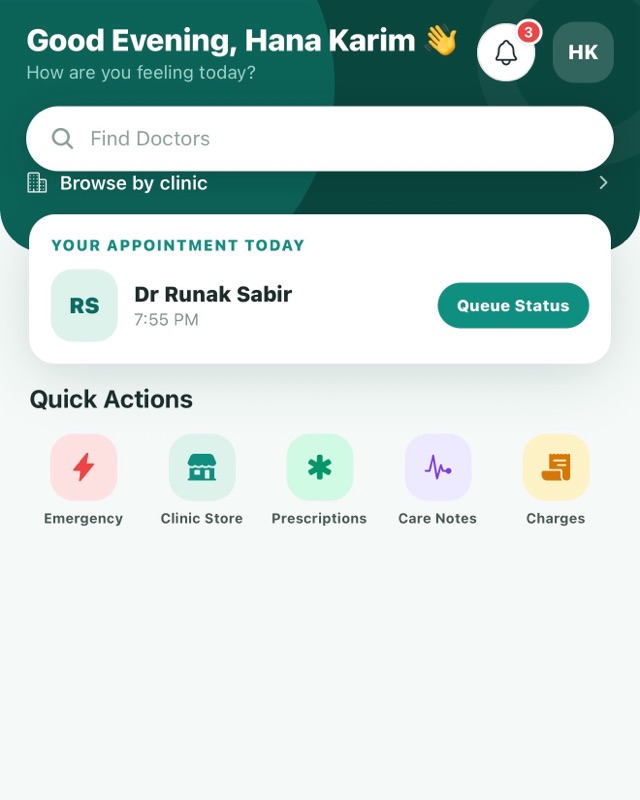
Search by name or specialty, browse by clinic, or filter by city — starting in Erbil, with more cities as clinics join.
Tap a common reason for a visit, like a skin rash or back pain, and see doctors in the matching specialty. It is a shortcut to the right kind of doctor, not medical advice.
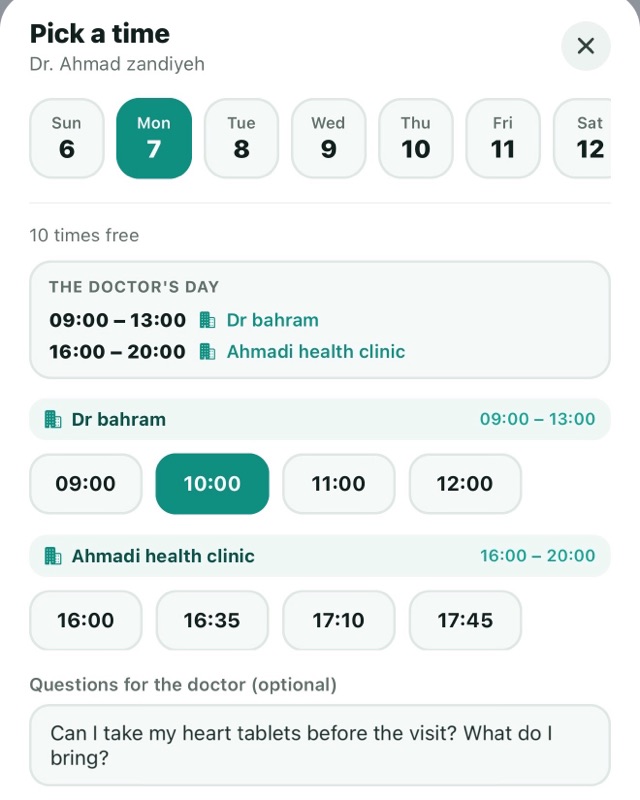
A real calendar against the doctor's real working hours. Doctors at several clinics show times for each, so the time you tap decides where you book.
A visit booked in the app gets up to three reminders in your notifications — 24 hours, 3 hours and 1 hour before, for whichever of those are still ahead when you book. In the last 48 hours before the visit, tap “I'll be there” and the clinic's list shows it.
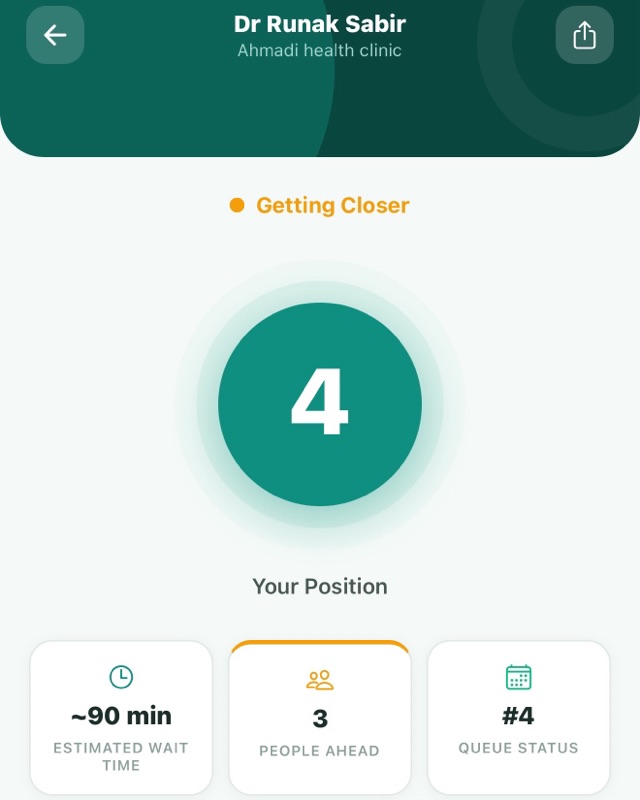
Your place in line, how many people are ahead of you and the estimated wait in your own doctor's line — an estimate from the day's schedule until you check in at the clinic, then the live queue.
Add your children, parents or spouse and book their visits from your own account. Each has their own health record, and a second parent can share a child's profile once they accept.
The doctor writes medicines, lab tests and scans in the app. You get a separate QR for each place that fills a part — pharmacy, lab, scan centre. No lost paper.
Browse the store of a clinic you have an appointment with, request what you need and collect it at the clinic. You pay there — nothing is charged in the app.
Day fully booked? Join its waitlist. If someone cancels, the first person in line gets the time to themselves for up to 20 minutes. Accept and it is booked.
Seminars, screening days and announcements published by real doctors — each one reviewed before it appears.
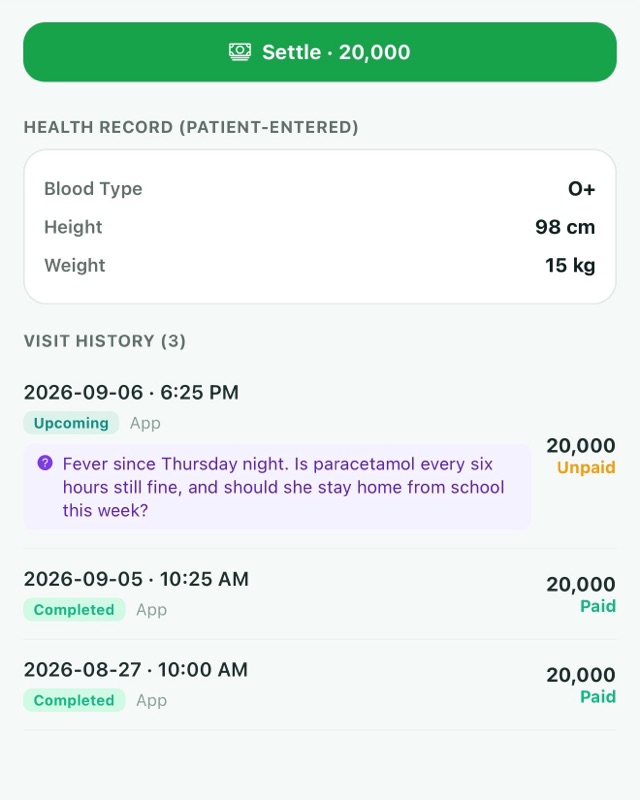
Write your questions when you book, or any time before the visit. They appear under that visit in the doctor's app, so nothing is forgotten in the room.
Vitals, diagnosis, diet and instructions from every visit stay in the app — instead of evaporating on the drive home.
For clinics
Built around how a clinic front desk actually works — not around a template written somewhere else.
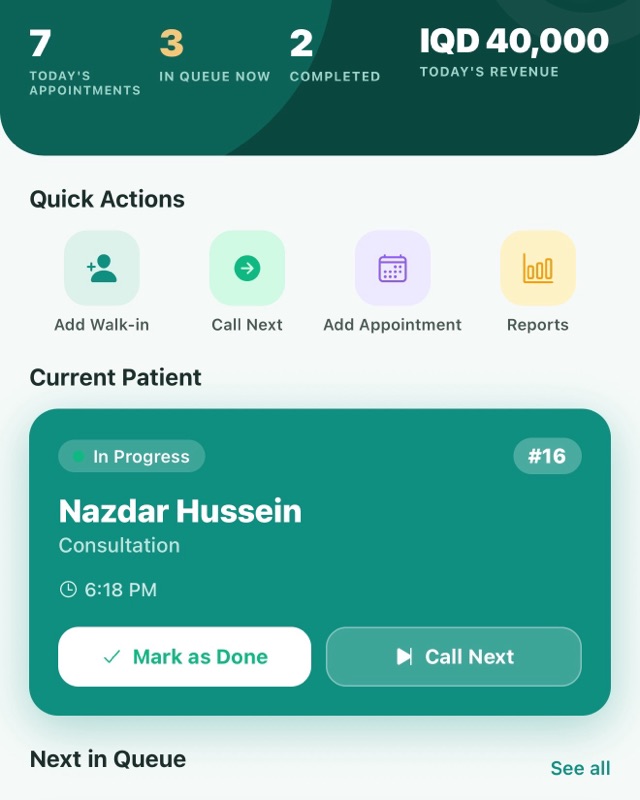
Call the next patient, move someone to the top, mark done or no-show, reopen a visit. Everyone at the desk sees the same lines within seconds, on any device.
Mark visits done, reschedule, cancel or mark a no-show. Nothing is deleted — the record of the visit stays in your reports. A Confirmed tag appears next to patients who tap “I'll be there”; no tag means they haven't answered.
Add secretaries, nurses and receptionists, then choose switch by switch what each person can see and do — queue, appointments, money, store, patient records and settings.
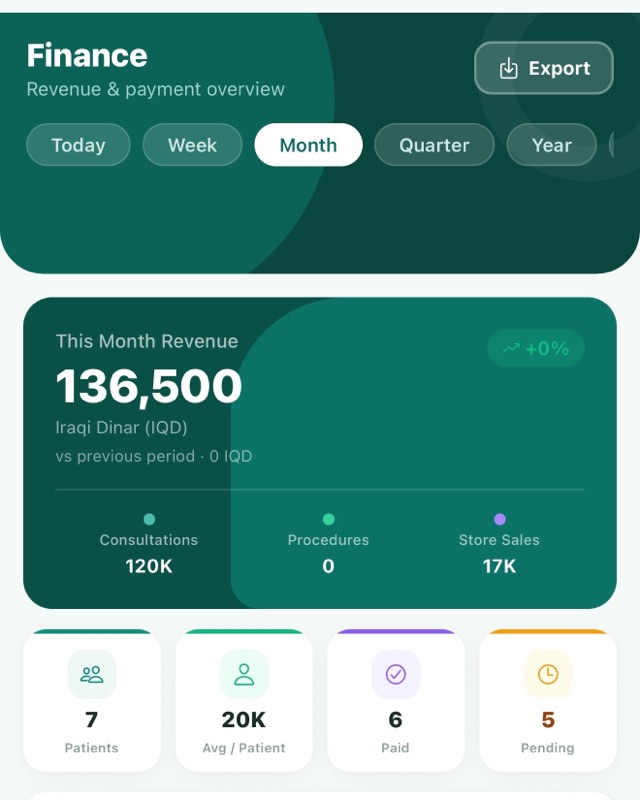
Takings, expenses and totals in Iraqi dinars or US dollars — switch the display currency whenever you like — converted at the exchange rate you enter yourself.
Procedures and consultation fees priced the way your clinic prices them, not the way a foreign template assumes.
Each doctor sets their own visit hours, visit length and gap between visits for every clinic they work at. The patient app can only book inside them, so the diary stays honest.
Write medicines, lab tests and scans once. Each pharmacy, lab or scan centre checks its own part on a web page, and you can open the prescription to see which parts are done.
Bookings, cancellations, reschedules, fee edits and queue calls are recorded with the staff member's name and the time. The clinic's doctors can open the log.
Medicine names are suggested from the WHO list of essential medicines, and doses, frequencies and note lines that doctors across DoctApp have typed before appear as you type — so common wording is quicker to enter.
Diagnosis, prescriptions, vitals, follow-ups and fees in tabs on one record — with the questions the patient sent in advance shown under their visit.
When an appointment is cancelled and patients are waiting for that day, the freed time is offered to the first in line, and passed on if they don't answer.
Search a built-in list of more than 240 lab tests, scans and other studies such as ECG, or type any test that isn't listed, and add a note such as “fasting” to each one.
Register in the clinic app with your licence documents. We review every application before your clinic becomes visible to patients.
Inside the apps
Shown with demo data and in English — the apps switch to your language.
Digital prescriptions
The doctor writes medicines, lab tests and scans in the app. The patient carries a separate eight-character code and QR for each place that fills a part: the pharmacy, the lab, the scan or study centre. Any of them — even one that has never heard of DoctApp — opens a single web page, enters the code and sees that part of the order, with the patient's name, the doctor and the clinic.
In your language
Arabic, Persian and Sorani Kurdish read right to left; English, Turkish and Badini Kurdish read left to right. Pick yours on the first screen and change it any time.
Tap any language to switch this page.
Getting started
Video guide
We are filming a full walkthrough — one for patients, one for clinic staff — and it will appear right here once the app finishes testing.
Coming soon
Want to be told when it is up? Message us on WhatsApp and we will send you the link.
Notify me on WhatsAppQuestions
No. Booking, the live queue, prescriptions and reminders are free for patients. Clinics arrange their access with us directly.
No. DoctApp has no insurance claims or insurance forms — it was built for a region that does not use them.
Patients sign in with their phone number: we send a short code by SMS and you type it in. There is no password for patients. Clinic staff can also use a password set up by the clinic owner.
Yes. Add them on the Family screen and book their visits from your own account. Each has their own health record, and a second parent can share a child's profile if they accept.
No. You pay the clinic directly. The clinic marks the visit as paid in its app; the app does not take payment.
Register in the DoctApp Clinic app with your licence documents. Every application is reviewed by hand before the clinic becomes visible.
You, the doctors of the clinic you visited, and that clinic's other staff within the limits its owner sets. DoctApp administrators can also open an account when a support case needs it, and that is logged. Clinics are separated from each other at the database level, not just in the screens. Anyone you give a prescription code to can see that part of the order, so show it only to the place you choose.
No — we don't have apps in Google Play or the App Store at the moment. DoctApp runs in your phone or computer browser, with nothing to install: use the links on this page to open the patient app and the clinic app.
Yes, for visits booked in the app: up to three reminders, 24 hours, 3 hours and 1 hour before (any that would already have passed when you book are skipped). They appear in the app's notifications, and in the last 48 hours before the visit you can tap “I'll be there” on your appointment.
Join that day's waitlist. If you already hold a later appointment with the same doctor at the same clinic, accepting an offer cancels it for you. If someone cancels, the first person in line is offered the time for up to 20 minutes, and accepting books it.
English, Arabic, Persian, Turkish, and Kurdish in two forms — Sorani and Badini. Tap Kurdish in the language list, then choose one. Everyone picks their own, so a doctor and a patient can each use a different language.
No. It is an appointment tool, not an emergency service. In a medical emergency in Iraq, call the ambulance line on 122 or go to the nearest hospital.
Open DoctApp in your browser right now — nothing to install.
Questions? WhatsApp +964 750 205 8457